
Showing posts with label Other. Show all posts
Showing posts with label Other. Show all posts

*This post will contain 2 side first will be description and 2nd will be the working process. If you already know the description then skip it.
1. Description:
This process contain two equipments no.1 is your android phone with a apk ( the apk is attached to this post ) and the 2nd one is a software installed in your pc. The software is also attached with this post. Just download those and install them. In this way only if you using wireless then remember that you can do it normally or by scanning QR code. But you should know that for that you have to be on the same WiFi network. *** No Internet Connection is Required ***
2.Process:
The PC software ( size= 43 mb )


The Mobile application ( size= 3 mb, premium version free for you )


This process can be established using three way.
a. WiFi connection;
b. USB cable;
c. Bluetooth cnnection.
A. Wi-Fi connection: Just run both app and software. Then in app you will see connect, press it.

 |
| PC Remote Receiver |
and if you cannot find then in the right of above it is scan icon press it and then in pc press bar code and scan it and boom it will start working.
B. USB cable: In this process you just need to attach your phone to pc using usb cable. And run both software and app. Then in your phone in down you will see written connect press their and then you will see an icon of usb cable press it and boom, the connection is established.
C.Bluetooth connection: ( Remember that for this process your pc need to be attached a bluetooth dongle ) Same as the previous processes just click the bluetooth icon the app and it will show the list and connect it.
# This was the process. If you find any issues then contact us using the contact form in the footer.
And keep visiting us if you need any kind of help. if you need any kind of technical help then feel free to contact us.
******Thank You*******
Control your PC keyboard, mouse and more thing by your own android phone.
 |
| PicsArt premium for free. |
1. File:
Here is the file in apk
And then install the apk. And thats it.
2.About PicsArt Premium:
Normally if you want to take the fun of picsart prremium it will charge you monthly.
But you won't have to face this problem anymore, after installing this file you will be able to
access it directly in free. We give the very simple way to improve performance which is really attractive I think. Thanks for downloading now use it and enjoy and if you need any kind of information, software or application just contact us using the contact from which is in down.
Keep visiting us and keep updated, Thank You.
PicsArt premium for free.
Top 3 ways to combine CSS with html |
| Combine html with CSS |
***The 1 and 3 no way is mostly granted.
Way 1 :
The first way is add the css code to html code by using <style> tag
You can add a html with css by entering css at the fond or last of the code
Example :
<html>
<style> css code
</style>
<p> your text </p>
</html>
Way 2 :
The second way is The code and the file will attch by a link and those file will stay togther. The system is create a folder and in that paste your name.css
and name.html and in the html write name.css in the link. And then when will you view the file the browser will got that it have a css file and browser will take it from folder.
Example :
<html>
<head>
<link rel="stylesheet" href="name.css">
</head>
<body>
Design It In Your Way
</body>
<html>
and name.html and in the html write name.css in the link. And then when will you view the file the browser will got that it have a css file and browser will take it from folder.
Example :
<html>
<head>
<link rel="stylesheet" href="name.css">
</head>
<body>
Design It In Your Way
</body>
<html>
Way 3:
As is it a bit long process there are two way given to you for learn no.1 is typed
And the no.2 is Photo in the last of porst, for easily understanding.
The 3rd way is a bit long process but it may help specially the bloggers and many others it is by Taking the CSS file from firebase.
For this go to google search and search for firebase and then sign up at the first time.
Then create a project by giving any name and go to the database. A popup will show check in read and right mode.
Then go to rules and delete write and then go to storage and upload the file.
Click on the uploaded file then click on location and click on download url.
The url will be copied in your clipboard.
All done now paste it in your html code by this.
Example:
<html>
<head>
<link rel="stylesheet" href="Paste the link here">
</head>
<body>
Design It In Your Way
</body>
<html>
Photo:
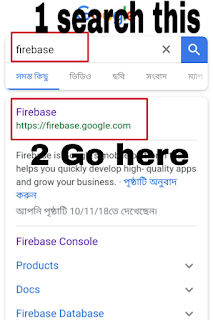


Top 3 ways to combine CSS with html
Subscribe to:
Posts
(
Atom
)


